03 AI automation

Custom AI systems
that help your business
run better.

NOW Media builds custom AI automation, dashboards, workflow systems, CRM automation, and internal business tools for growing businesses in Bangalore, India, and worldwide.

We start by understanding how your business actually runs: leads, operations, client servicing, reporting, revenue, expenses, people, and customer management. Then we build tools that reduce manual work, connect departments, track revenue gaps, and help founders make faster decisions.

Typical engagement ₹5L to ₹30L $6K to $40K USD
Timeline 4 to 16 weeks
Team Strategist + UI Designer + Product Designer
Call back
Invictus Performance Lab, fitness brand identity and digital systems by NOW Media, showcasing the studio cross-discipline build approach used for AI automation engagements

02 What this actually means

AI automation is not just chatbots.

Most businesses do not need another disconnected AI tool. They need less manual work, cleaner reporting, better follow-ups, and one place to see what is happening across the business.

That is what we build.

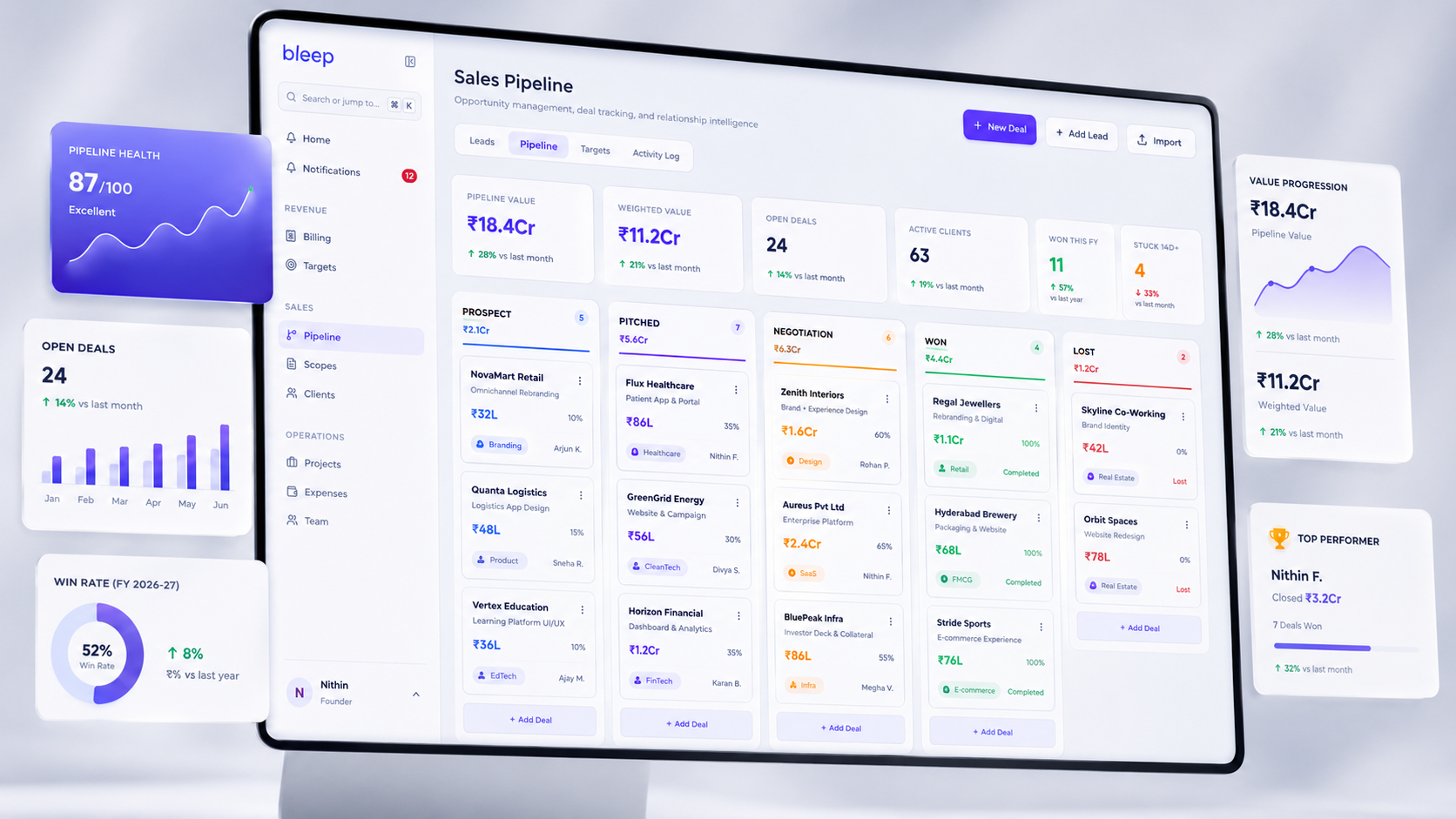
We create custom systems that bring your tools, teams, data, workflows, and decision points into one operating layer. This can include founder dashboards, lead automation, CRM workflows, multi-outlet reporting, internal AI assistants, approval systems, and business intelligence dashboards.

The goal is simple: fewer repeated tasks, fewer missed updates, fewer scattered spreadsheets, and better visibility for the people running the business.

04 What we build

Custom automation systems for real business problems.

  1. 01

    Founder dashboards

    Dashboards that bring revenue, expenses, profit, leads, outlet performance, customer data, team updates, and operational issues into one place.

    Useful for founders who currently depend on scattered updates, delayed reports, or multiple tools to understand what is happening.

  2. 02

    Lead and CRM automation

    Systems that capture leads from ads, websites, forms, WhatsApp, and landing pages. We help route leads to the right person, track follow-ups, flag delays, and show where leads are being lost.

    Useful when growth is happening, but the sales process is still dependent on manual tracking.

  3. 03

    Operations automation

    Tools that reduce repetitive reporting, manual updates, approval delays, spreadsheet dependency, and daily status checks.

    Useful for teams that spend too much time asking for updates instead of acting on them.

  4. 04

    Client servicing systems

    Internal tools for account teams to track requests, approvals, timelines, deliverables, follow-ups, and relationship health.

    Useful for service businesses where client communication, delivery, and accountability need to be visible in one place.

  5. 05

    Multi-outlet reporting

    Platforms for businesses with multiple brands, outlets, branches, or locations.

    We help compare revenue, footfall, expenses, customer feedback, team updates, service issues, and operational gaps across locations.

  6. 06

    Internal AI assistants

    AI assistants connected to your workflows, documents, SOPs, project data, or business knowledge.

    These are not generic chatbots. They are designed around the questions your team asks every day and the decisions they need help making.


05 What every build includes

Five things every automation project includes.

  1. 01

    Business workflow audit

    We map how work currently moves across your business: leads, operations, client servicing, CRM, reporting, expenses, revenue, people, and customer management.

    The goal is to find where time is being lost, where data is scattered, and where manual inputs can be reduced.

  2. 02

    Revenue and efficiency gap mapping

    We identify the gaps that affect growth. This could include missed follow-ups, slow reporting, outlet-level blind spots, repeated manual work, disconnected tools, or decisions being made without live visibility.

    This gives us a clear view of what the system needs to improve.

  3. 03

    Custom tool architecture

    We design the system around your business, not around a trending AI tool.

    This can include dashboards, internal portals, CRM flows, lead automation, reporting systems, approval workflows, AI assistants, and integrations with your existing tools.

    Where your current tools are useful, we connect them. Where they slow you down, we replace the workflow.

  4. 04

    AI-enabled build

    We build the automation layer your team will actually use.

    The system brings data, tasks, updates, and decisions into one place so your team spends less time reporting and more time moving the business forward.

  5. 05

    Training and continuous improvement

    We onboard your team, document the workflows, track usage, and improve the system after launch.

    The goal is not just to ship a tool. The goal is to make the business run with less dependency, less repetition, and better visibility.


06 How it runs

Five phases. Built around your business.

00

Discovery Blueprint

Every AI automation engagement starts with the Discovery Blueprint.

We use it to understand how your business runs today: where leads come from, how teams follow up, how outlets report, how clients are serviced, where data lives, and where founders lose visibility.

01

Understand

We sit with the people doing the work.

That can mean reviewing the spreadsheets, WhatsApp updates, dashboards, CRM flows, reports, approval chains, and tools your team already uses.

We do not start by forcing AI into the business. We start by understanding where the business is leaking time, money, or clarity.

02

Map

We map workflows, tools, departments, data sources, decision points, and ownership.

This shows what should be automated, what should be connected, what should stay manual, and what needs to be visible in one place.

03

Build

We build the custom dashboards, automations, internal tools, and AI-assisted workflows.

You see progress through weekly demos, working prototypes, and real usage. The system is shaped around how your team actually works, not just how the process looked on paper.

04

Improve

After launch, we monitor adoption, usage, and business impact.

We improve the system based on real behaviour: what the team uses, where they get stuck, what saves time, and what gives leadership better visibility.


07 Use cases by industry

Custom AI automation, mapped to your industry.

Every business runs differently. The dashboards a hospitality group needs are not the dashboards a real estate brokerage needs.

Here is how custom AI automation shows up across the industries we work with most. Each one is a real build pattern, not a generic capability list.

  • Hospitality groups

    Restaurant chains, cafe groups, cloud kitchens, multi-property hotels

    • AI-enabled sales automation across delivery, dine-in, and event bookings
    • Multi-outlet revenue view with covers, average ticket, footfall, and outlet P&L
    • GM dashboard for daily ops, staff attendance, customer feedback, and complaints
    • Founder dashboard rolling up brand revenue, cost, and outlet ranking
    • Partner dashboard for franchisees with their own outlet view

    One live operating view across every outlet, instead of WhatsApp updates and Monday reports.

  • Fitness chains

    Gyms, studios, performance labs, multi-branch fitness operators

    • Member lifecycle automation across sign-up, onboarding, renewal, and win-back
    • Lead conversion engine for paid traffic from Meta and Google
    • AI-enabled operational dashboards for footfall, class load, trainer utilization, and churn
    • Multi-outlet view comparing branches on revenue, retention, and member NPS
    • Founder dashboard with cash flow, marketing ROI, and cohort retention

    Fewer member drop-offs, faster lead response, and a clear view of which branches actually grow.

  • Real estate teams

    Brokerages, developers, channel partner networks, residential and commercial

    • AI-enabled sales automation across WhatsApp, web forms, portals, and inbound calls
    • Lead conversion engine that qualifies, scores, and routes every enquiry inside a minute
    • Listing match automation pairing buyer briefs to live inventory
    • Partner dashboard for brokers and channel partners with their own pipeline view
    • Founder dashboard with conversion rates, broker performance, and inventory velocity

    Brokers stop chasing cold leads. Every enquiry gets a fast, structured response.

  • Healthcare operators

    Multi-specialty clinics, dental groups, diagnostic chains, wellness providers

    • AI front desk handling appointments, reminders, and follow-ups across WhatsApp, calls, and web
    • AI document workflows for intake forms, insurance claims, referral letters, and clinical notes
    • AI-enabled operational dashboards for appointment load, no-show rates, and doctor utilization
    • Multi-outlet view across branches with revenue, footfall, and patient satisfaction
    • Founder dashboard with revenue per service line, payer mix, and outlet performance

    Doctors get back to patient care. Operations get cleaner reporting and fewer missed claims.

  • D2C and consumer brands

    E-commerce, multi-channel retail, marketplace sellers, subscription products

    • AI-enabled sales automation across Meta, Google, marketplaces, and owned channels
    • Lead conversion and cart recovery flows tied to live inventory and margin
    • AI-enabled operational dashboards for SKU performance, returns, and CAC by channel
    • Multi-brand or multi-SKU view for founders running more than one product line
    • Founder dashboard with channel mix, contribution margin, and burn against revenue target

    Marketing spend, inventory, and revenue stop living in separate spreadsheets.

  • Professional services

    Law firms, accounting practices, consulting groups, advisory and design studios

    • AI document workflows for contracts, invoices, intake forms, and client deliverables
    • AI-enabled client servicing dashboards tracking requests, approvals, and timelines
    • Lead conversion engine for inbound enquiries with automatic qualification and routing
    • Partner dashboard for senior partners with their book of business and team load
    • Founder dashboard with utilization, realization, and revenue per partner

    Less time spent chasing internal updates. More time spent on client work.


08 Common questions

AI automation FAQ.

  • Is NOW Media an AI automation company in Bangalore?

    Yes. NOW Media is a Bangalore-based creative and technology studio that builds custom AI automation, dashboards, workflow systems, CRM automation, and internal business tools for businesses in India and worldwide.

  • What kind of AI automation does NOW Media build?

    NOW Media builds founder dashboards, lead automation, CRM workflows, operations automation, client servicing systems, multi-outlet reporting dashboards, internal AI assistants, and custom business tools.

  • Is AI automation only about chatbots?

    No. AI automation can include dashboards, workflow automation, CRM systems, reporting tools, internal search, data consolidation, approval systems, and AI assistants. NOW Media focuses on business efficiency, not just chatbot implementation.

  • How does NOW Media start an AI automation project?

    Every project starts with the Discovery Blueprint. We study how the business runs, where work is repeated, where data is scattered, and where founders or teams lack visibility. Then we design the right automation system.

  • What businesses need AI automation?

    AI automation is useful for businesses with repeated manual work, disconnected tools, large lead volumes, multiple outlets, client servicing complexity, manual reporting, or founders who need clearer visibility across departments.

  • How much does an AI automation project cost?

    Typical AI automation engagements range from ₹5L to ₹30L ($6K to $40K USD) depending on the complexity of the workflows, number of integrations, dashboards, AI assistants, and internal tools required.

  • How long does an AI automation project take?

    Most AI automation projects take 4 to 16 weeks. Smaller workflow automations can move faster, while deeper internal tools, dashboards, or multi-department systems may take longer.


Ready to make your business easier to run?

Start with the Discovery Blueprint. We'll understand your workflows, identify the gaps, and show you where custom AI automation can save time, reduce manual work, improve visibility, and support better decisions.